RTX Spark vs the Fastest MacBook Pro (M5 Pro / M5 Max)
NVIDIA's RTX Spark finally landed in my hands inside Microsoft's Surface Laptop Ultra, and I spent the last stretch benchmarking it against Apple's fastest MacBook Pro with M5 Max, plus M5 Pro, base M5, AMD's Strix Halo and a proper gaming laptop. The pitch from NVIDIA and Microsoft is that this chip is the foundation of future computing — for AI builders, creators and gamers alike. After living with it, I kept asking myself one question: who is this actually for?
Here's everything I measured, and where the answer lands.
What you'll get out of this
- Exactly what the N1X SoC is, its two variants, and what every configuration costs
- CPU, GPU and creator-app benchmarks against M5, M5 Pro, M5 Max, Ryzen AI Max+ 395 and an RTX 5070 laptop
- Six LLMs from 12B to 70B parameters in LM Studio, with notes on MLX vs GGML
- Gaming frame rates at 1600p through Prism emulation, including the games that simply refuse to run
- Battery life, performance-on-battery drop-off, and a hardware tour of the Surface Laptop Ultra itself
The lineup I put against it
The Surface Laptop Ultra I have carries the new N1X chip with 120 GB of unified memory and costs close to $6,000. I don't think that number has registered in my brain cells yet. So I wanted to see where it fits if you're genuinely shopping at that price point.
Against it: the M5 Max MacBook Pro, the M5 Pro, and the base M5. I also threw in HP's ZBook Ultra with AMD's Ryzen AI Max+ Pro 395 and the same 120 GB unified memory layout. And for fun, a gaming laptop — the Lenovo Legion Pro 5i with Intel's Arrow Lake CPU pulling 130 W paired to an RTX 5070 laptop GPU.
What RTX Spark actually is
It's a brand new system-on-chip design from NVIDIA. A single chip using their Grace CPU cores, broken into Cortex X925 performance cores and A725 efficiency cores, co-built with MediaTek. And yes — those architectures launched more than two years ago, so the foundation isn't exactly new. It also features a Blackwell GPU and a unified memory pool shared between CPU and GPU, which ties the whole package together.
NVIDIA is sort of pulling an Apple here with how they're splitting the chip into variants.
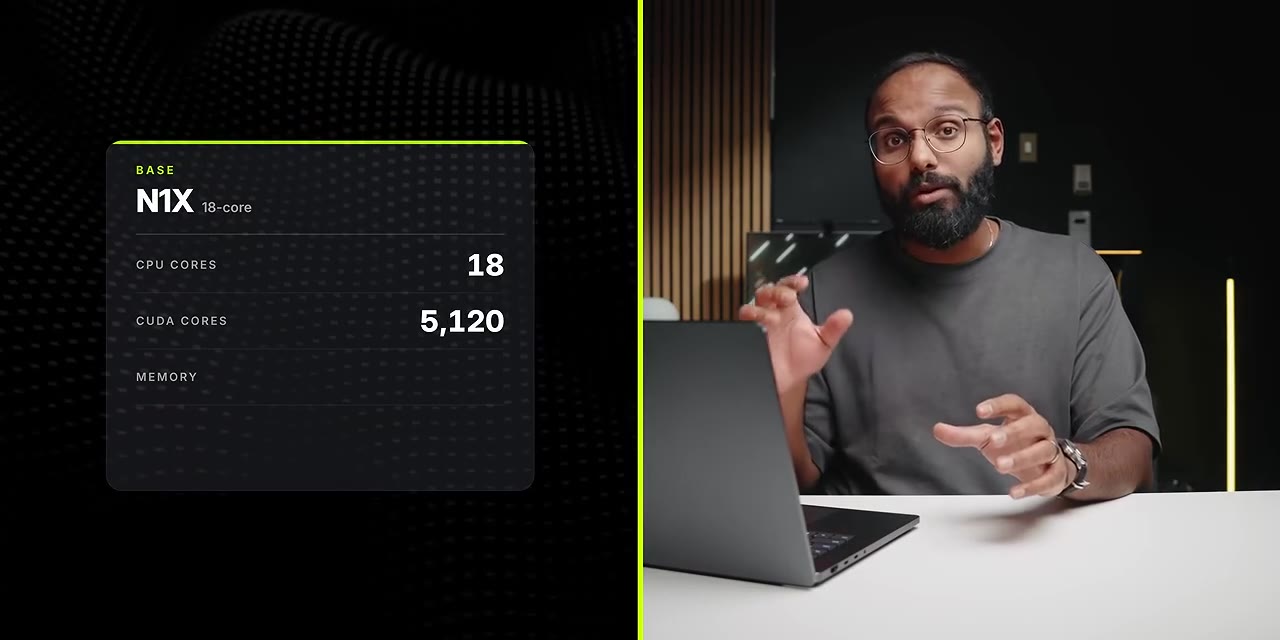
Two flavours of N1X, and what they cost
| Variant | CPU cores | CUDA cores | Memory |
|---|---|---|---|
| Base N1X | 18 | 5,120 | 24 or 32 GB |
| Top-tier N1X | 20 | over 6,000 | 24 GB up to 128 GB |
On the Surface Laptop Ultra that works out to roughly $2,600 for the base N1X with 24 GB and half a terabyte of storage, and $3,700 for the top-tier chip with 32 GB. The 120 GB loaner I have is close to $6,000.
Here's something genuinely bizarre: the 64 GB memory configuration ships with an optional 2 TB drive, but the 120 GB model drops back to just 1 TB. I'm not sure why that isn't reversed — probably storage demand — but I wanted you to know about it.
For context, the base M5 MacBook Pro with 32 GB is around $2,400. Step up to M5 Pro with 64 GB and it's around $3,700 — so for the same price as the mid Surface, you get double the memory on the Mac. The M5 Max with 128 GB is close to $7,000. These laptops are just, ooh wee, expensive.
Meanwhile HP's ZBook Ultra in the 120 GB config is on sale for less than $4,500, down from almost 12 grand — I'm not kidding, I took a screenshot a few days ago. And the Legion Pro 5i as configured with 32 GB and the RTX 5070 is about $2,700.
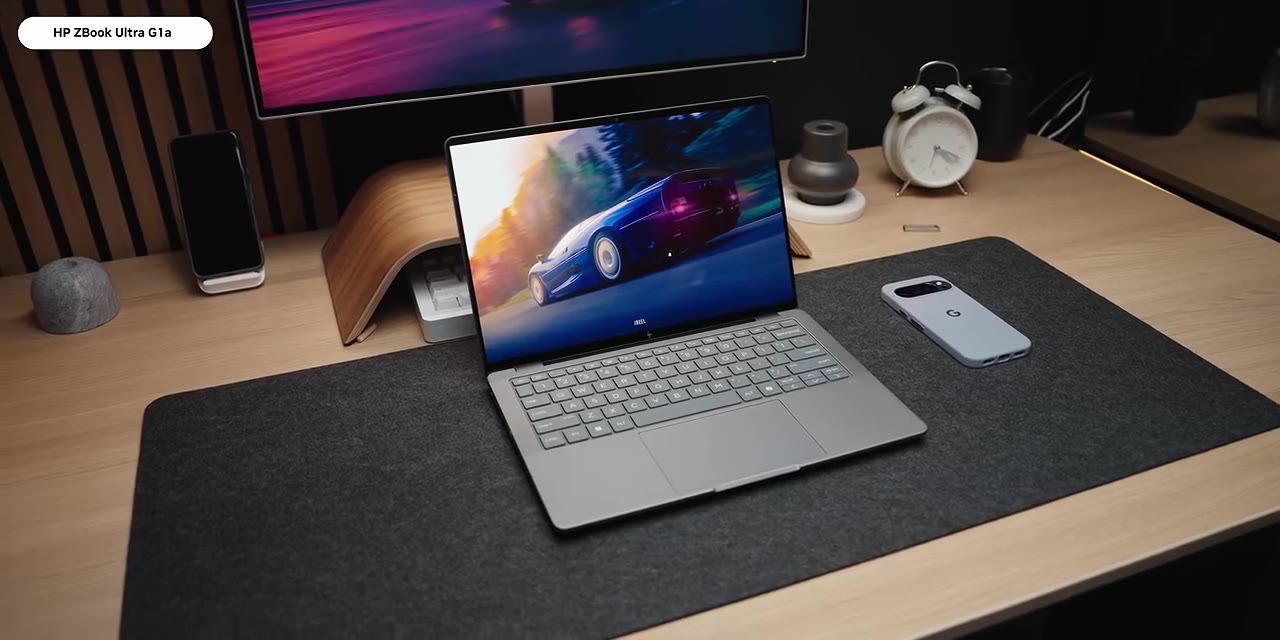
So the Surface Laptop Ultra is the second most expensive laptop in this room, trailing only the M5 Max MacBook Pro, and about $1,500 more than the ZBook with identical memory.
CPU: where those old ARM cores come back to haunt it
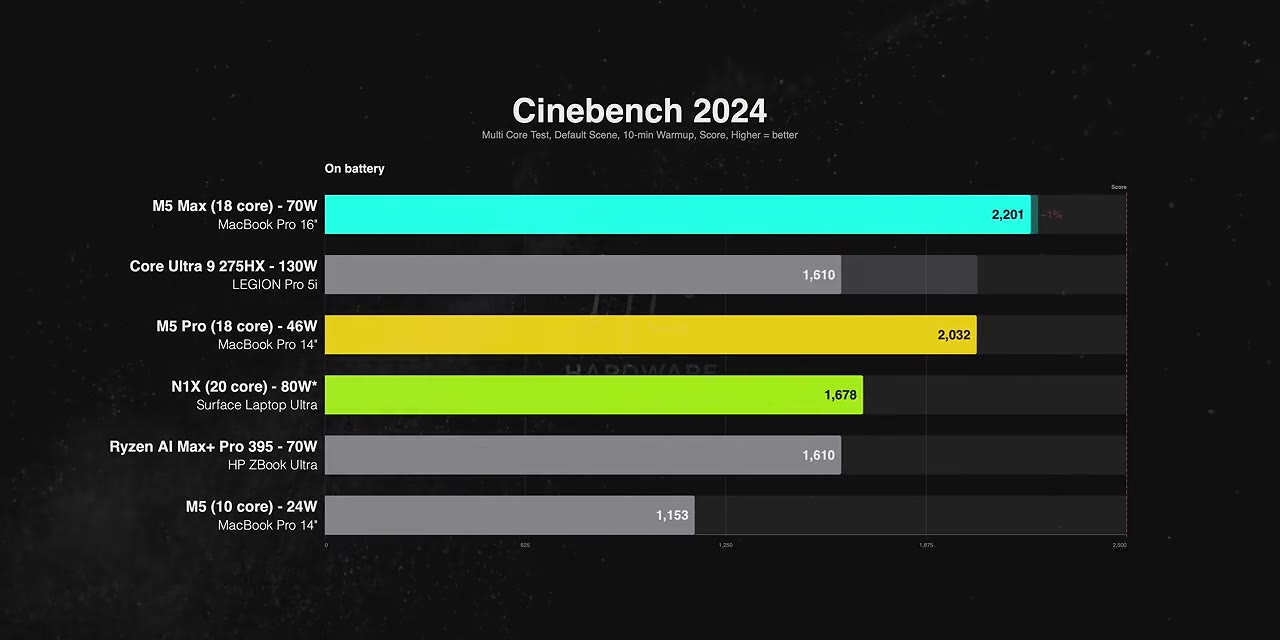
A quick note on these numbers: the 80 W listed for RTX Spark is total SoC power, not CPU or GPU alone, because at the time of testing neither GPU-Z nor HWiNFO have official support for it.
In single core, the N1X isn't off to a great start against the M5 family in Cinebench 2026. Against Intel's Arrow Lake in the Legion it's pretty close, and it almost ties in Cinebench 2024, but it clearly beats the AI Max+ Pro 395 in both. For quick bursty single-core work it gets the job done — Apple's architecture is just way ahead.
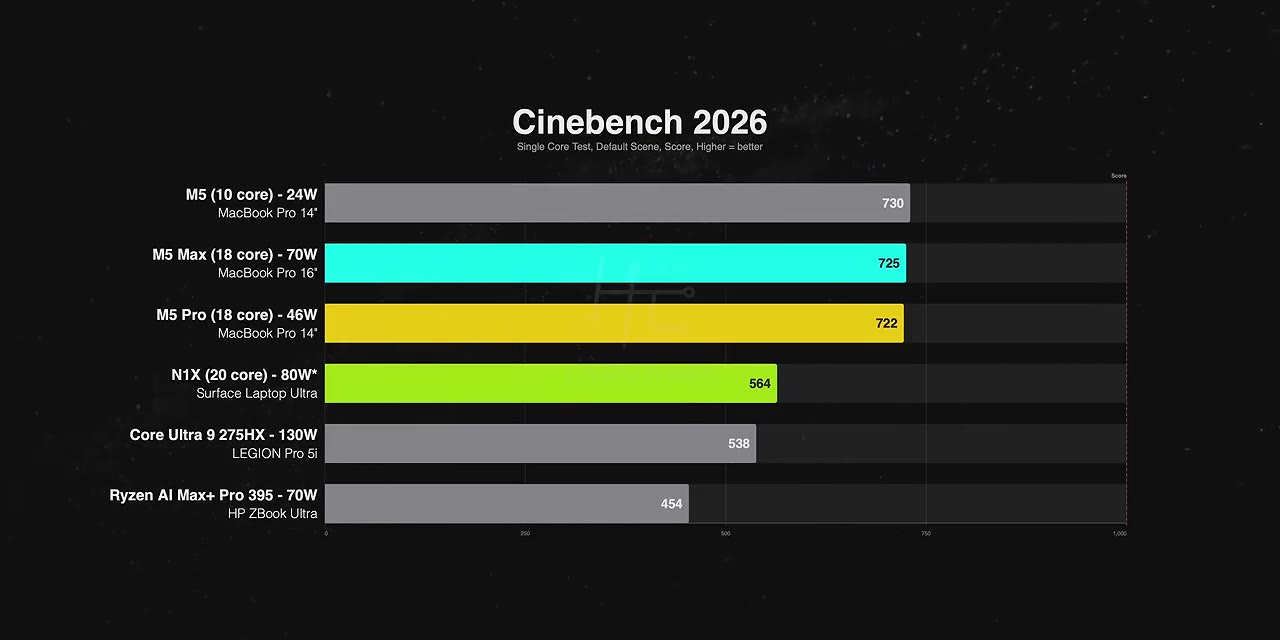
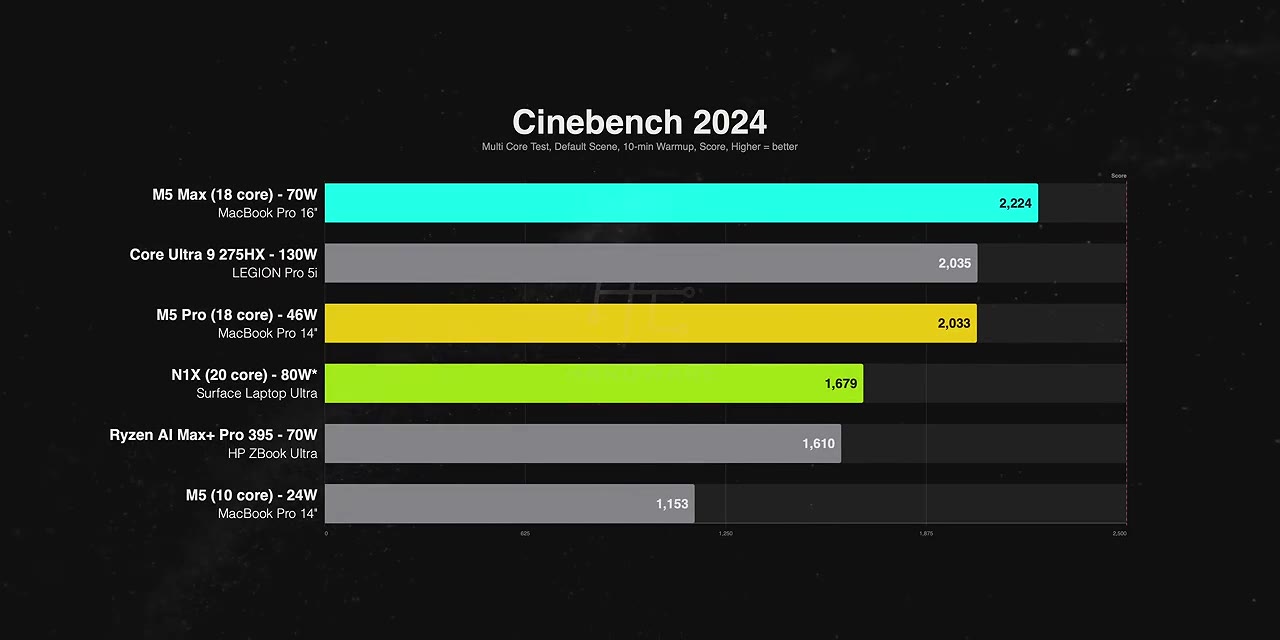
Stretch all the cores and the N1X trails the M5 Pro by about 17%. It also falls behind the Legion Pro 5i, which makes sense — Intel has more cores and a much bigger power budget. It does pull ahead of the Ryzen AI Max+ 395 by around 14%. Cinebench 2024 tells the same story: despite two more cores, about 17% behind M5 Pro. M5 Max is on a whole new level; the performance per watt out of that chip is incredible.
That led me to conclude the N1X's natural competitor isn't M5 Max — it's M5 Pro. And these are 10-minute sustained runs, not burst numbers.
Fan noise and coil whine
Under full workloads the Surface Laptop Ultra is surprisingly quiet. The thermal engineering Microsoft pulled off is awesome — in a full-core workload I can barely hear the fans, pretty much on par with the MacBook Pro. But there is coil whine, and it's noticeable in a quiet room, especially when you load the GPU with an AI task.
Rendering and encoding
In Blender on CPU, the N1X takes about a third longer than M5 Pro and even trails the AI Max+ Pro 395. In HandBrake it's about 15% behind M5 Pro, though it beats that Ryzen chip by almost a minute. CPU performance per dollar just isn't impressive here — those cores are a few years old and have a lot of catching up to do.
GPU-accelerated work: NVIDIA's bingo card
With the OptiX ray tracing engine enabled in Blender, the N1X finishes the render about 18% faster than M5 Pro. It also lands within about 8% of the RTX 5070 laptop GPU running at 112 W, while sitting on a much smaller power budget.
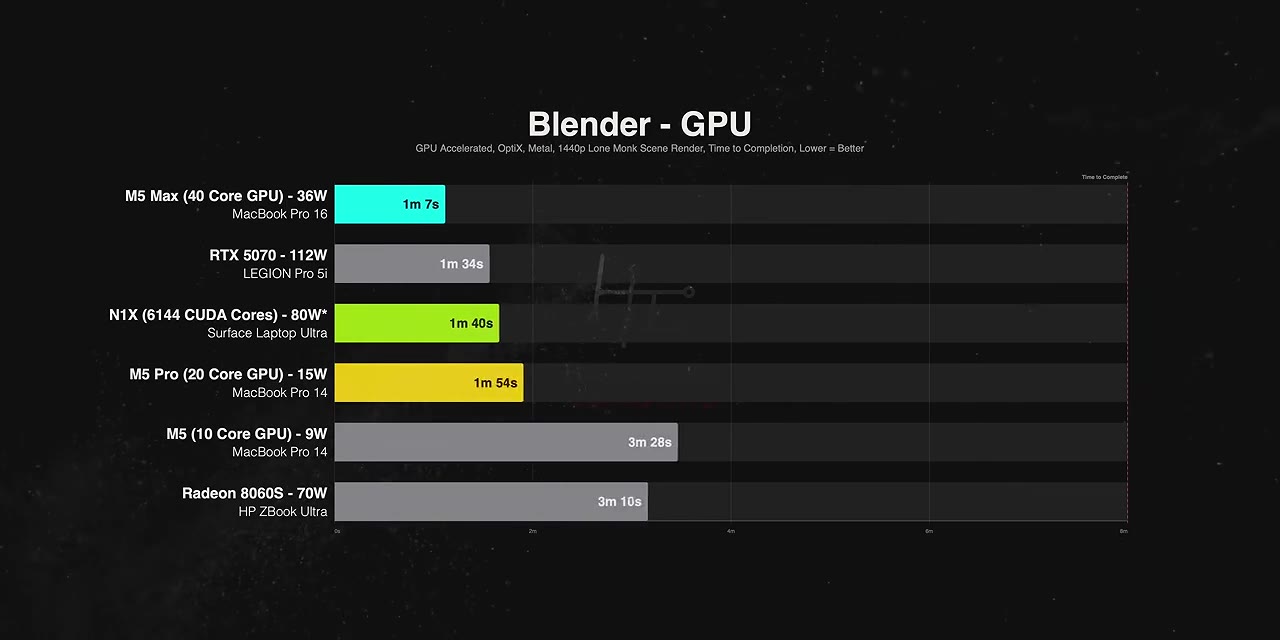
Unfortunately HandBrake has no official NVENC support here, so it failed to complete the task. I even tried the Media Foundation preset designed for Qualcomm chips and that failed too. I hope this gets addressed sooner rather than later.
Creator apps: this is where it falls apart
Adobe Photoshop — using a beta build made specifically for this platform — puts the N1X dead last. About 40% behind M5 Pro, trailing the ZBook, and basically tied with Intel's Arrow Lake. Even the base M5 MacBook Pro, which costs about $3,500 less than this machine, is roughly 45% faster.
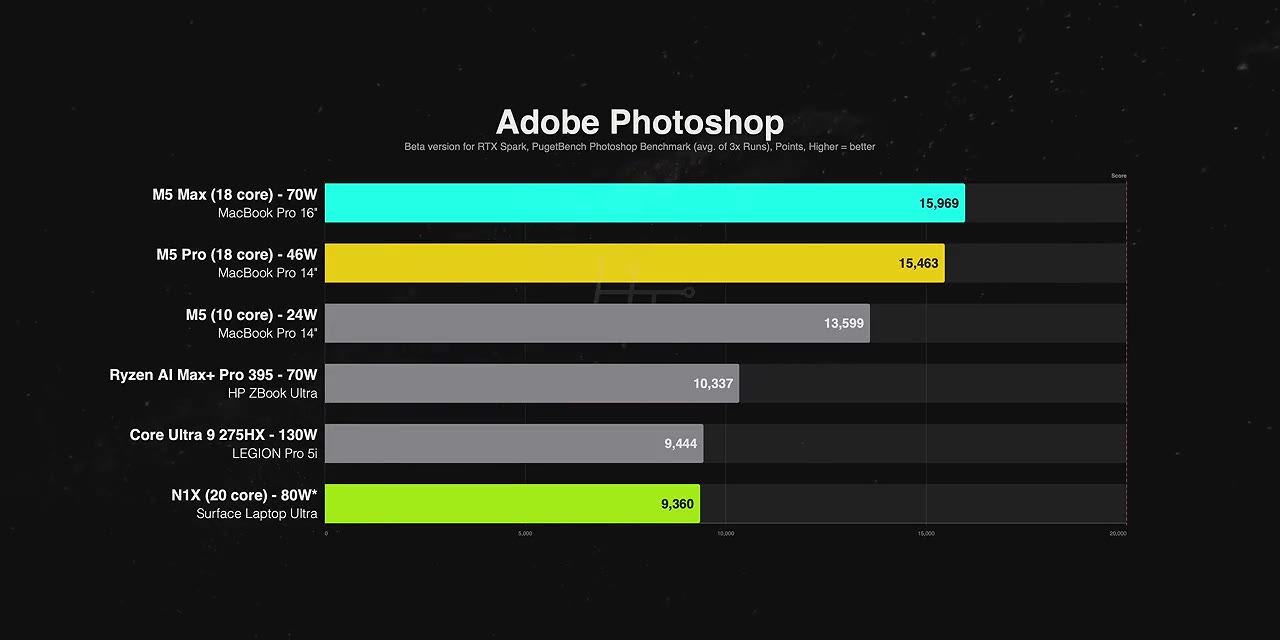
Adobe Lightroom: exporting 124 megapixel RAW photos to JPEG at 100% quality, the N1X took more than three times as long as M5 Pro and nearly twice as long as the base M5. Lightroom Classic is running through the Prism layer, so I'm hoping optimizations or a native version arrive soon.
Adobe Premiere Pro export times run roughly 20% longer than M5 Pro, while M5 Max does it in less than half the time. And I have to mention that the Windows on ARM version of Premiere still lacks:
- Hardware accelerated export
- MKV import
- Intel compile plugins
- RAW format support — ProRes RAW, ARRI RAW, Canon Cinema RAW Light, Sony XOCN
Adobe says it's coming soon, but that's absolutely unforgivable for a native version that's been out almost a year. If you work closely inside the Adobe ecosystem there's just no reason to consider RTX Spark. You shouldn't be paying for a promise when you can get working production-level software on x86 or Apple Silicon from day one. And honestly, this isn't an RTX Spark problem — the hardware is capable. It's Windows on ARM.
DaVinci Resolve Studio narrows the gap: our 4K project renders within about 5% of M5 Pro. M5 Max still needs about half the time, which shows how well Resolve is tuned for Apple Silicon and that big, well-optimized media engine.
Local AI: six models in LM Studio
This is supposed to be home turf. I'm still working out how to fully exploit AI on these laptops and there are plenty of application types left to explore, but for now I ran six models in LM Studio, from 12 billion to 70 billion parameters.
Methodology note: on the Mac side, Gemma 4 12B, GPT-OSS 20B and Gemma 4 31B ran on MLX, Apple's own optimized framework. The 27B and 70B models ran in standard GGML on both platforms. So some Mac results get a boost from the native backend rather than being an apples-to-apples GGML comparison — I'll call it out as I go.
| Model | N1X vs M5 Pro | Notes |
|---|---|---|
| Gemma 4 12B (MLX on Mac) | 16% behind | ~70% ahead of Ryzen AI Max+, 50%+ ahead of RTX 5070; M5 Max roughly 2× N1X |
| GPT-OSS 20B (MLX on Mac) | 9% behind | Steady lead over Strix Halo 395 and the Zephyrus G14; nearly doubles the RTX 5070 |
| Qwen 3.8 27B Q4 (GGML both) | 10% ahead | Within 12% of M5 Max; more than 5× the RTX 5070 |
| Qwen 3.8 27B Q8 (GGML both) | 8% behind | ~30% behind M5 Max |
| Gemma 4 31B (MLX on Mac) | 12% behind | Less than half M5 Max; 4×+ the RTX 5070; base M5 can't load it |
| DeepSeek R1 Llama Distill 70B Q4 (GGML) | 8% behind | 60% ahead of the ZBook; won't fit on the Legion at all |
On quantization: think of it as compression levels. Higher numbers like Q8 keep more detail and stay closer to full quality but need more memory bandwidth; Q4 shrinks the model, runs faster, and gives up a little accuracy.
The Qwen 27B Q4 run is where the N1X leaves the RTX 5070 in the dust — that model no longer fits inside the 5070's 8 GB of VRAM, so it spills into system memory. The N1X is more than five times faster.
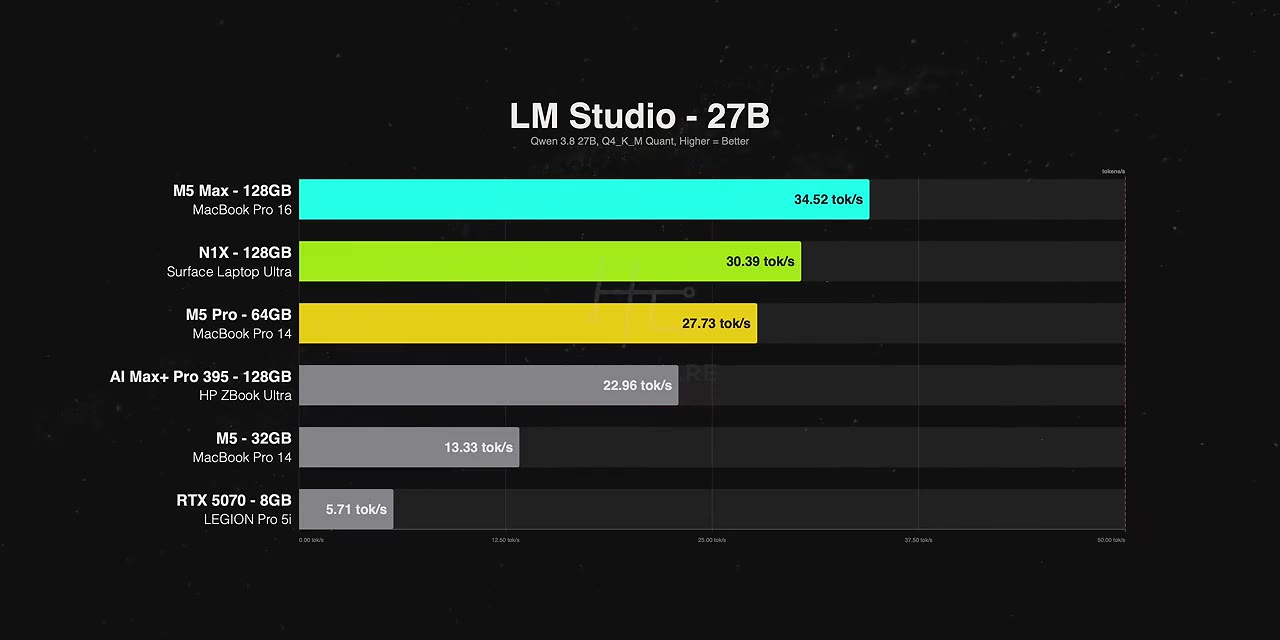
And that's the real ace up RTX Spark's sleeve. The unified memory architecture lets CPU and GPU draw on a single large pool, dynamically or manually allocated. If you want to run a massive model locally that chews through 20, 30, 50 GB without spilling into system memory, you can't do that on any laptop with a discrete GPU — you can on N1X.
The heavier, higher-quality models clearly favour Apple Silicon. My read is that M5 Max's memory bandwidth holds up better when a model leans hard on it, since it has double the bandwidth of the N1X. At 70B Q4, the model fits comfortably inside M5 Pro's 64 GB, and the Mac still wins.
Zooming out
For local AI the N1X isn't the fastest out there — but look at it as a Windows machine. It beats the ZBook Ultra with the exact same 120 GB of unified memory in every single model we ran. It smoked the RTX 5070, especially on larger models. And you get CUDA, one of the most popular toolchains for AI developers. Pair that with a massive unified memory pool in a thin Windows laptop and nothing else in this lineup offers that combination. It's easily one of the best Windows laptops for local AI. It just isn't enough to catch the MacBook Pros.
Gaming at 1600p
Most Windows games are still built for x86, so on N1X they run through Microsoft's Prism emulator. Key thing: only the CPU side is emulated — the GPU runs natively. So the more a game leans on the processor, the bigger the tax.
To be fair, Microsoft and NVIDIA put in work. Prism has been specifically tuned for RTX Spark: better frame pacing, advanced shader delivery to cut stutter, anti-cheat being addressed for some titles, and more ARM-native games on the way.
Disclaimer on the Mac side: Cyberpunk, Baldur's Gate 3 and Warhammer 3 run natively. Everything else was tested through the CrossOver translation layer.
Native on Mac:
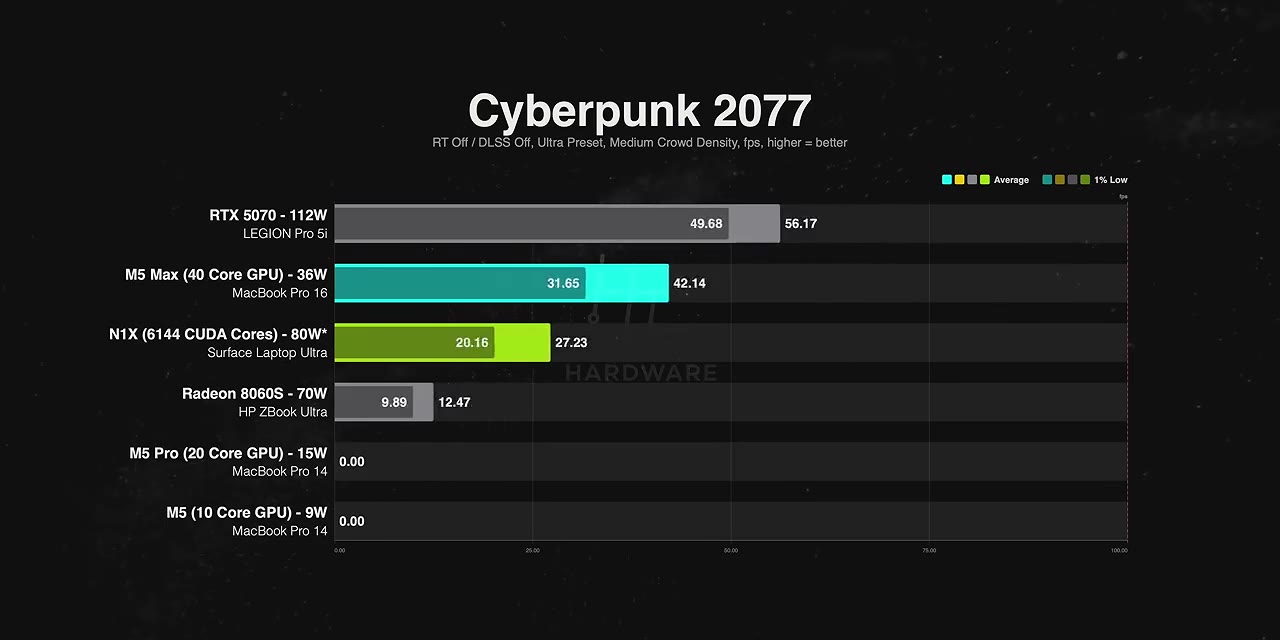
- Cyberpunk — N1X about 65% faster than M5 Pro, with 1% lows more than three and a half times higher
- Baldur's Gate 3 — N1X about 14% ahead of M5 Pro with much smoother 1% lows. M5 Max posted a higher average but its 1% lows were absolutely brutal; I ran it multiple times and never found a fix
- Warhammer 3 — N1X about 44% ahead of M5 Pro; M5 Max's average is about 44% higher again, but the N1X's 1% lows are far better
So despite the Max getting native support while Spark emulates, the overall experience was smoother on N1X.
Through CrossOver on Mac:
- Black Myth: Wukong — N1X about 25% ahead of M5 Pro, within 5% of the RTX 5070
- Indiana Jones — won't run on the Macs at all, no compatibility. N1X lands about 23% behind the 5070 and nearly 50% ahead of AMD's Radeon 860S
- Counter-Strike 2 — as CPU-bound as it gets. N1X still 43% ahead of M5 Pro, but the 5070 runs nearly three times the frame rate and even the Radeon is about 22% faster
- Marvel Rivals — decent average, but the 1% lows meant constant stuttering and the whole thing was an eyesore
And then the games that just didn't run: Battlefield 6 isn't supported, Rainbow Six Siege is blocked by anti-cheat, Doom Eternal wouldn't run. That's three of the ten titles we tried. Same story on the Macs — compatibility just isn't there. So while RTX Spark runs more of our games than any Mac, it's nowhere near a dedicated gaming laptop with a discrete GPU.
Battery life: uh oh
I had high hopes here, and this is where things took a turn.
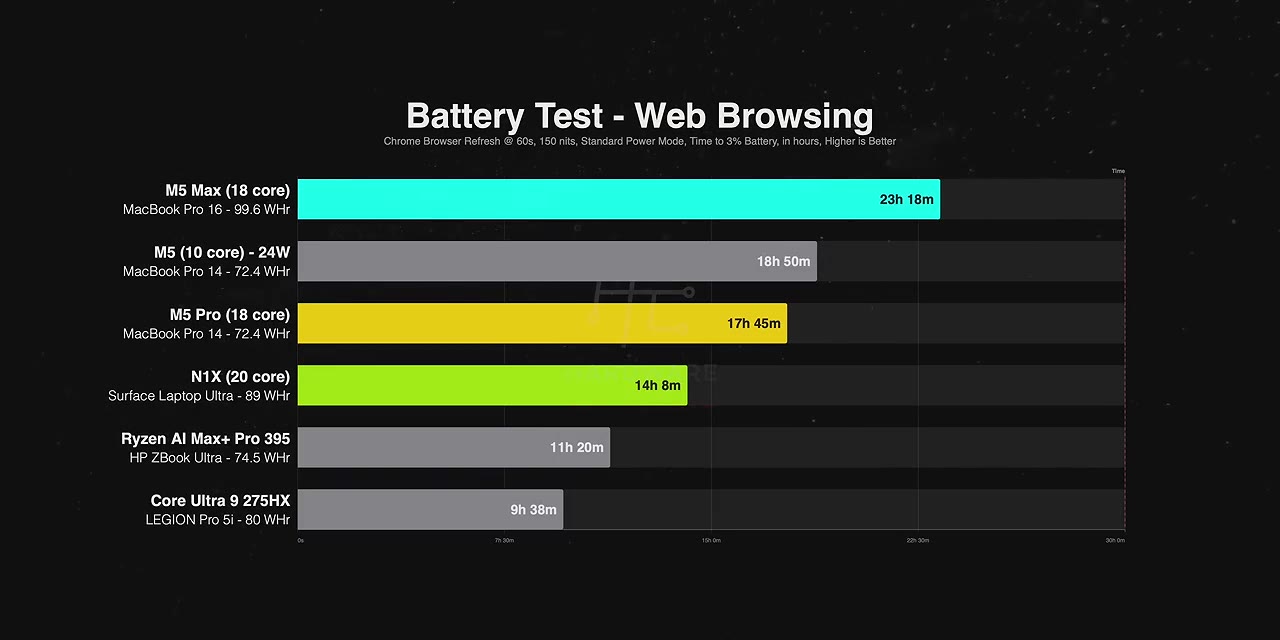
In web browsing, it lasted about 20% less than M5 Pro — even though the Surface packs a bigger battery than the 14-inch MacBooks. Against the 16-inch M5 Max it's about 40% less. It does beat the ZBook Ultra and the Legion by a good margin, but for the same battery size the N1X is barely more efficient than Strix Halo. For an ARM chip, that's embarrassing.
In 4K YouTube playback it completely falls apart. Runtime drops more than 40% compared to browsing, while the MacBook Pros actually lasted longer on YouTube than browsing, thanks to Apple Silicon's built-in media engines. That leaves the N1X lasting about 60% less than M5 Pro and less than a third as long as the base M5. It still beats the x86 laptops, but that's not the bar NVIDIA set for itself.
Gaming on battery is the one result where it holds its own. Running Cyberpunk, it basically matches M5 Pro, outlasts M5 Max by about 19%, and beats the ZBook by about 25%. Keep in mind the M5 Pro is in a 14-inch chassis with a smaller battery — a 16-inch would change that number.
Performance on battery
NVIDIA's guides claim RTX Spark maintains roughly 95% of its performance unplugged. Reality:
- Across our tests, the Macs show essentially no drop on M5, M5 Pro or M5 Max
- N1X drops about 26%, similar to Strix Halo — at least it's not as bad as Arrow Lake
- HandBrake takes 27% longer, which does beat the Arrow Lake Legion
- Photoshop on the RTX Spark beta build drops 40%
So from our testing the N1X can't even hold 80% of its performance on battery. That's not great for creators planning to work on the go.
The Surface Laptop Ultra hardware itself
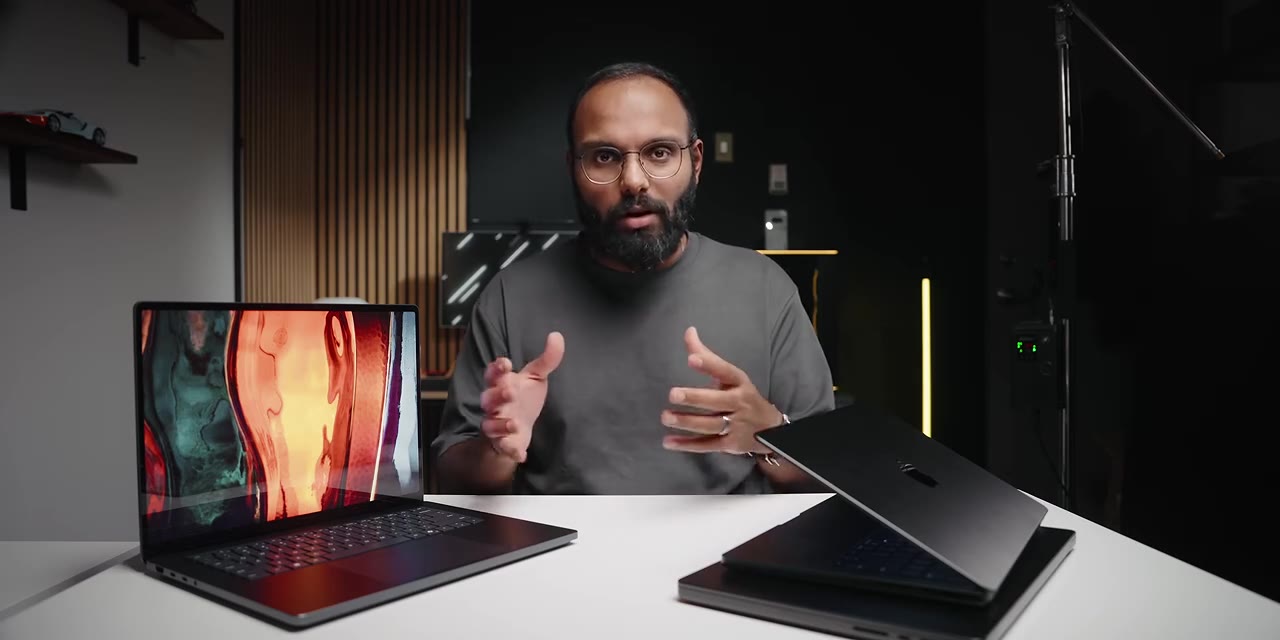
Take RTX Spark out of the equation and this is a fantastic piece of hardware — arguably one of the most premium Windows laptops I've ever handled. A 15-inch unibody chassis in CNC anodized aluminium, only 18 mm (0.71 in) thin and 4.5 lb / 2 kg. Put it next to the 14-inch M5 Pro MacBook Pro and the Z-height is very similar.
The 1,000-nit display
A 15-inch 3.2K touchscreen with variable refresh up to 120 Hz. Colour-wise it's neck and neck with the MacBook Pro — both cover 100% sRGB and nearly 100% DCI-P3. The Surface is slightly better on colour accuracy, though with my naked eye I truly couldn't tell. But it's blindingly bright: in SDR it peaked over 1,000 nits, 55% brighter than the MacBook Pros, making it the brightest display we've ever tested. I do wish there were a matte option, but with that much brightness it cuts through glare just fine.
Trackpad, keyboard, speakers
The interior is clean and minimal — I really like the styling. The trackpad is haptic, so it's precise and responsive anywhere you press, and it goes beyond clicks: Premiere, Resolve, Photoshop and the Microsoft Office suite support haptic feedback, so you feel subtle taps as you scrub timelines or snap elements into place. That extends into Windows window management too, which is really cool.
The keyboard feels nice to type on, backlit, with less light bleed around the keys. The speakers are impressive — two speaker boxes with integrated drivers, soft-mounted to cut chassis rattle, firing out of the side vents. They are loud, and the bass is great. I do wish there were four up-firing drivers to bring more life to the higher frequencies, because vocals sound muffled next to the god-tier setup on the MacBook Pros.
Magnetic power and ports
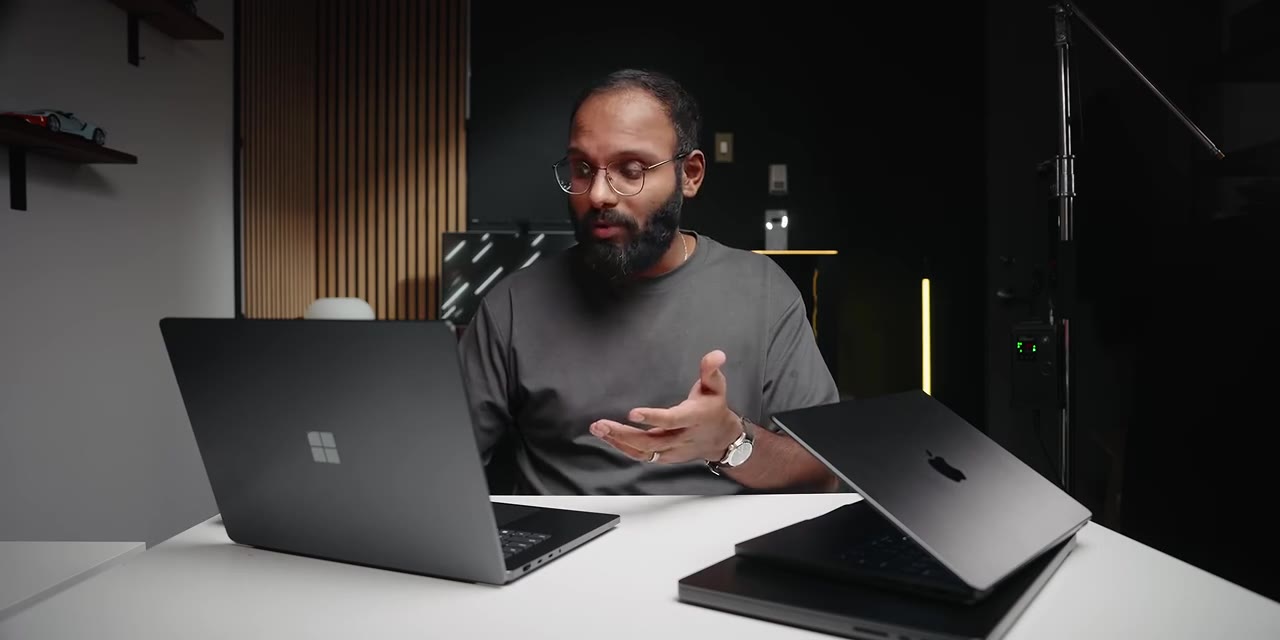
Microsoft calls it the world's first built-in magnetic USB-C charging. The cable snaps into place with an LED confirming charge, and because it's still USB-C that port handles data and display output as well. The catch: the magnetic connector only works on that one port — it won't fit the USB-C ports on the left side.
The included 140 W adapter is nice and compact, similar to the MacBook Pro's. But the cable is super short — probably the shortest power cable I've seen, shorter than the MacBook Pro's. Microsoft will happily sell you an extension cord for a premium.
Port selection is generous for this size:
- 3× USB 4 Type-C
- HDMI 2.1
- Full-size USB Type-A at 10 Gbps
- Full-size UHS-II card reader
- Headphone jack
Serviceability and SSD
I appreciate Microsoft making this somewhat serviceable. Get past four screws beneath the rubber feet and you can replace the SSD — you can't do that on a MacBook Pro because everything's integrated into the PCB, which really sucks. And that Gen 5 drive is bonkers: faster than both the M5 Max and M5 Pro MacBook Pros.
Final thoughts
I really applaud NVIDIA and Microsoft for creating this platform. It's a unique approach and it brings NVIDIA's AI supremacy to a unified memory architecture. But with all the caveats and broken promises of Windows on ARM, this thing isn't for anyone other than AI developers who need that massive memory pool and the accessibility of CUDA on Windows.
- Want the efficiency and battery life Windows on ARM was supposed to be known for? No-go.
- Want the ultimate creator workstation? Absolutely not.
- Want a device guaranteed to run every game? This ain't it.
On configurations: the 120 GB model is a genuinely interesting option for AI developers. But at 32 GB I honestly don't know why you'd pick an RTX Spark — anything under 40 GB on an AI-branded laptop just isn't worth it, in my opinion.
Another way to look at it: if this had launched before the AI boom, it would be dead on arrival. It's a one-trick architecture that only gets viewed positively because of where we are right now with AI. For everyone else, the question "why should I pick RTX Spark over Apple or x86?" ends with a simple answer: you shouldn't.
That said, I'm excited to revisit this in two or three years, provided NVIDIA stays committed to the architecture, improves the optimizations, and works deeply with Microsoft on a better Windows on ARM experience. If there's one company that can influence Microsoft, it's NVIDIA. I'm rooting for them — but right now this is a first-gen product that leaves a lot to be desired.
Read next
-
 Test video for storiteca
I'm Jane Houston Jones from NASA's Jet Propulsion Laboratory in Pasadena, California, and this is what November's sky has for you. It's a binocular month: the Moon, a few star clusters, a close pairing of Venus and Jupiter, and a comet… Сalihand
Test video for storiteca
I'm Jane Houston Jones from NASA's Jet Propulsion Laboratory in Pasadena, California, and this is what November's sky has for you. It's a binocular month: the Moon, a few star clusters, a close pairing of Venus and Jupiter, and a comet… Сalihand
-
 Александр Овечкин забросил первую шайбу в сезоне и снова превзошел Уэйна Гретцки / Момент дня
12 октября «Вашингтон» принимал «Сиэтл» — и проиграл 3:5, но запомнится этот матч не счётом. Александр Овечкин наконец-то забросил первую шайбу в новом регулярном чемпионате НХЛ, а заодно снова обошёл Уэйна Гретцки в ещё одном рейтинге… Хоккей Sport24
Александр Овечкин забросил первую шайбу в сезоне и снова превзошел Уэйна Гретцки / Момент дня
12 октября «Вашингтон» принимал «Сиэтл» — и проиграл 3:5, но запомнится этот матч не счётом. Александр Овечкин наконец-то забросил первую шайбу в новом регулярном чемпионате НХЛ, а заодно снова обошёл Уэйна Гретцки в ещё одном рейтинге… Хоккей Sport24
-
 Купили автодом в Нидерландах! Большое приключение
Мы проснулись в Гамбурге в 4:20 утра, пересели на четыре поезда подряд, взяли в Нидерландах машину в аренду и поехали через всю страну смотреть автодома. Внизу — вся поездка как она была: дорога, прокат, конкретные машины с ценами и… BorisGetsCash
Купили автодом в Нидерландах! Большое приключение
Мы проснулись в Гамбурге в 4:20 утра, пересели на четыре поезда подряд, взяли в Нидерландах машину в аренду и поехали через всю страну смотреть автодома. Внизу — вся поездка как она была: дорога, прокат, конкретные машины с ценами и… BorisGetsCash